
Automate your workflows.

I automate recurring workflows, connect your software and develop websites and internal applications. For small and medium-sized businesses that want less manual copying and chasing. I use AI where it makes sense for the task.

How I work

What I build for your business.

From initial intake
to the next step.

Enquiries & documents

Capture enquiries, check document details and prepare proposals. Missing or conflicting information remains visible for clarification.

Incoming enquiries

  • Email

    “Quote for consulting …”

    Today, 09:24
  • Web form

    “Website project enquiry”

    Today, 08:17
  • Message

    “Do you have availability …?”

    Yesterday, 16:03

Automated workflow

  1. 1. Capture

    Read and structure the content.

  2. 2. Validate

    Check completeness, plausibility and duplicates.

  3. 3. Assign

    Determine the department, owner and priority.

  4. 4. Prepare

    Prepare a quote, response or question.

Result

Ready for processing

Qualified enquiry

  • All relevant details captured
  • Correctly assigned
  • Quote suggestion prepared
The workflow in detail
Illustrative workflow. No client data. Rules and exception paths are agreed for your business.

CRM & integrations

Connect your CRM, ERP, email or accounting software so information does not have to be entered twice. I check which integrations are possible beforehand.

Scattered information

  • Email

    New telephone number

    Inbox
  • Contact

    Existing contact person

    Address book
  • Spreadsheet

    Open project enquiry

    Team list
  • Existing software

    Customer number & case

    ERP

Reconciliation & handover

  1. 1. Validate

    Check required details and permitted data flows.

  2. 2. Reconcile

    Identify the contact. Route conflicts for clarification.

  3. 3. Synchronise

    Update the agreed fields in the systems.

  4. 4. Hand over

    Bring together responsibility, context and the next action.

One shared view

Data reconciled

Example company

CRM / Contact & case

Responsible
Sales
Status
Contact verified
Next action
Prepare a response

One shared view for the handover.

Illustrative workflow. No client data. Rules and exception paths are agreed for your business.

Approvals & reminders

Record responsibilities, send reminders about open cases and obtain approvals. The next steps follow the agreed rules.

What is still open

  • Approval pending

    Review quote draft

    Decision
  • Enquiry unanswered

    Response missing

    Follow-up
  • Deadline approaching

    Next step due tomorrow

    Date

Approvals & reminders

  1. 1. Route

    Send approval to the agreed role.

  2. 2. Assign

    Assign the responsible person and deadline.

  3. 3. Remind

    Remind only while the step remains open.

  4. 4. Track

    Record approval, escalation and the next step.

Traceable status

Next steps clarified

Approvals at a glance

  • Approval completedDecision documented
  • Clarification assignedEscalation to project lead
  • Reminder scheduledOnly while a response is pending
Illustrative workflow. No client data. Rules and exception paths are agreed for your business.

One thought first: less manual work, clear workflows

00:00 / 00:22

Illustrative workflow, not client results. One enquiry creates recurring manual work. Without clear ownership and handoffs, the next step stays unclear. A defined workflow captures the enquiry, assigns information, checks required details and prepares a draft. A person decides whether to approve it. AI is used only where rules fall short. You receive a clear workflow, a working solution and an organised handover.

04 / Work

Work you
can understand.

My own projects and examples.
Clearly labelled as such.

01WebsitesView

My own project

DerKIArchitekt

Explain an offer. Make enquiries possible.

A website with services, examples and a direct way to get in touch.

Starting point
Visitors need to understand what is offered and how to get in touch.
System
I developed the content, interface and enquiry process for this website. The form checks entries and clearly reports whether submission was confirmed.

A website with services, examples and a direct way to get in touch.

Project enquiry
The DerKIArchitekt website with its clear path from offer to enquiryNext.js · React · server validation
02Enquiry processView

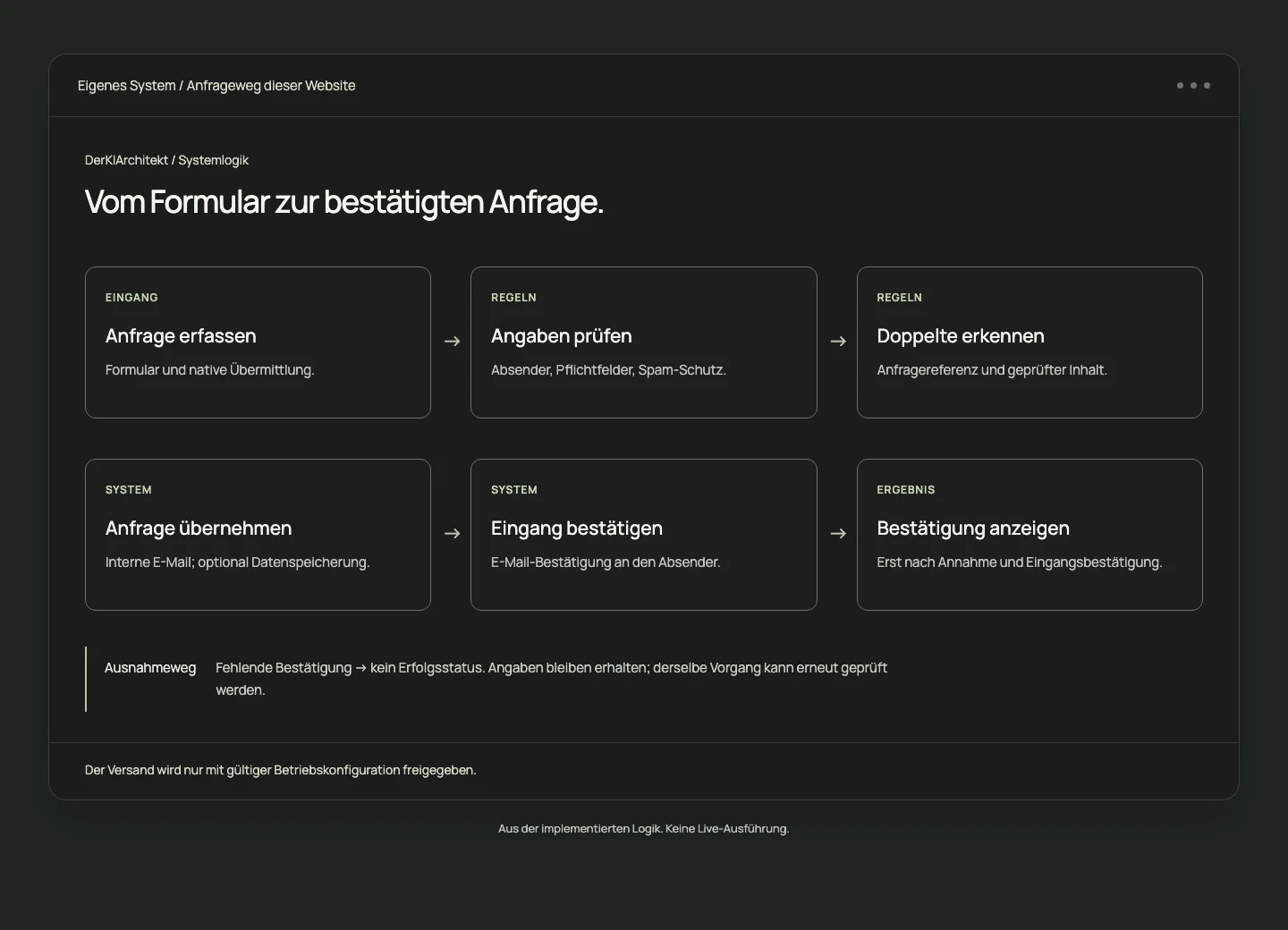
My own system · This website’s enquiry flow

Enquiry to response

From form to confirmed receipt.

My own implementation with validation, sending and feedback.

Starting point
After submitting, it must be clear whether an enquiry has been received.
System
The enquiry process validates required fields and recognises repeat submissions. Feedback reflects the confirmed result; entries remain if the connection fails.

My own implementation with validation, sending and feedback.

Project enquiry
Implemented enquiry flow: validate details, detect duplicates, deliver emails and acknowledge receipt

My own enquiry flow · Implementation view

Form · Validation · Delivery · Acknowledgement
03Custom softwareView

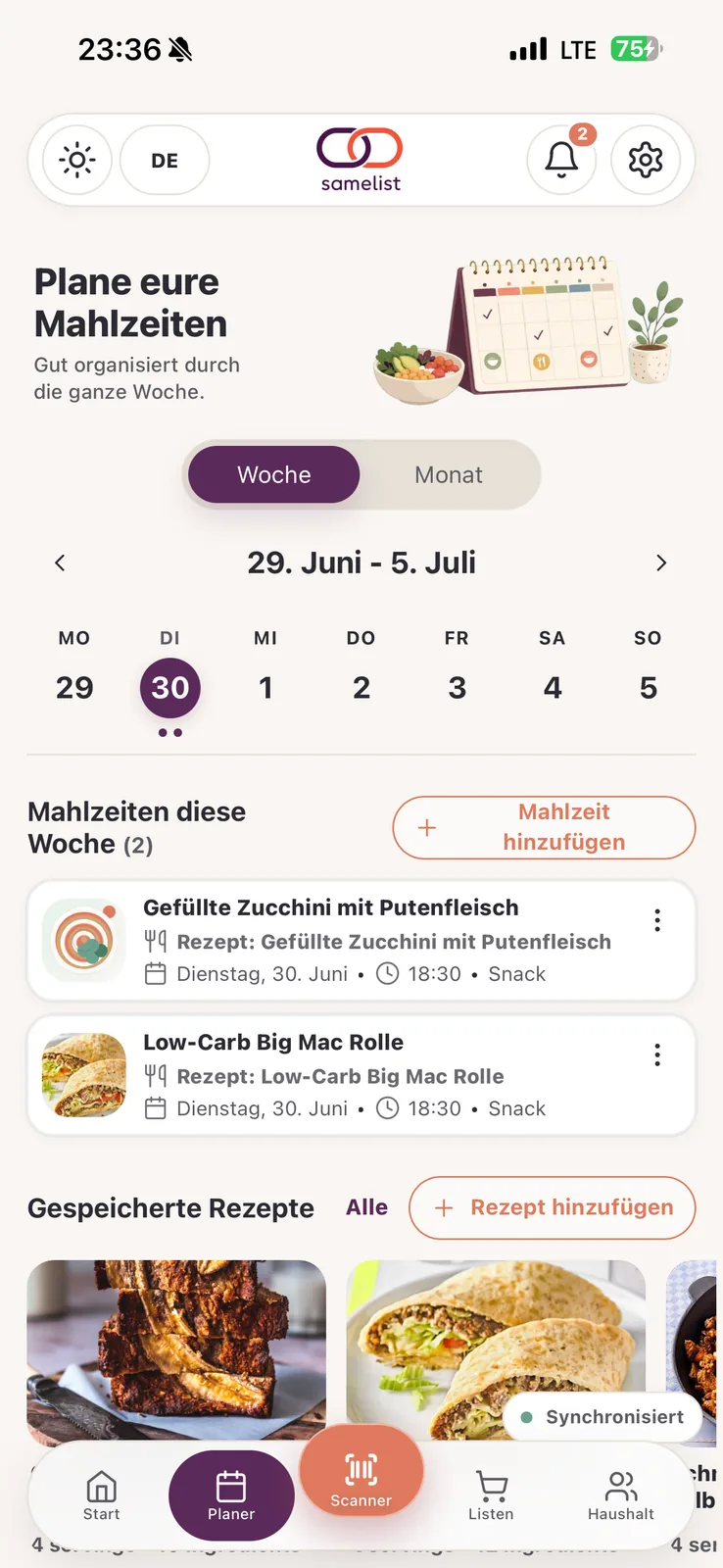
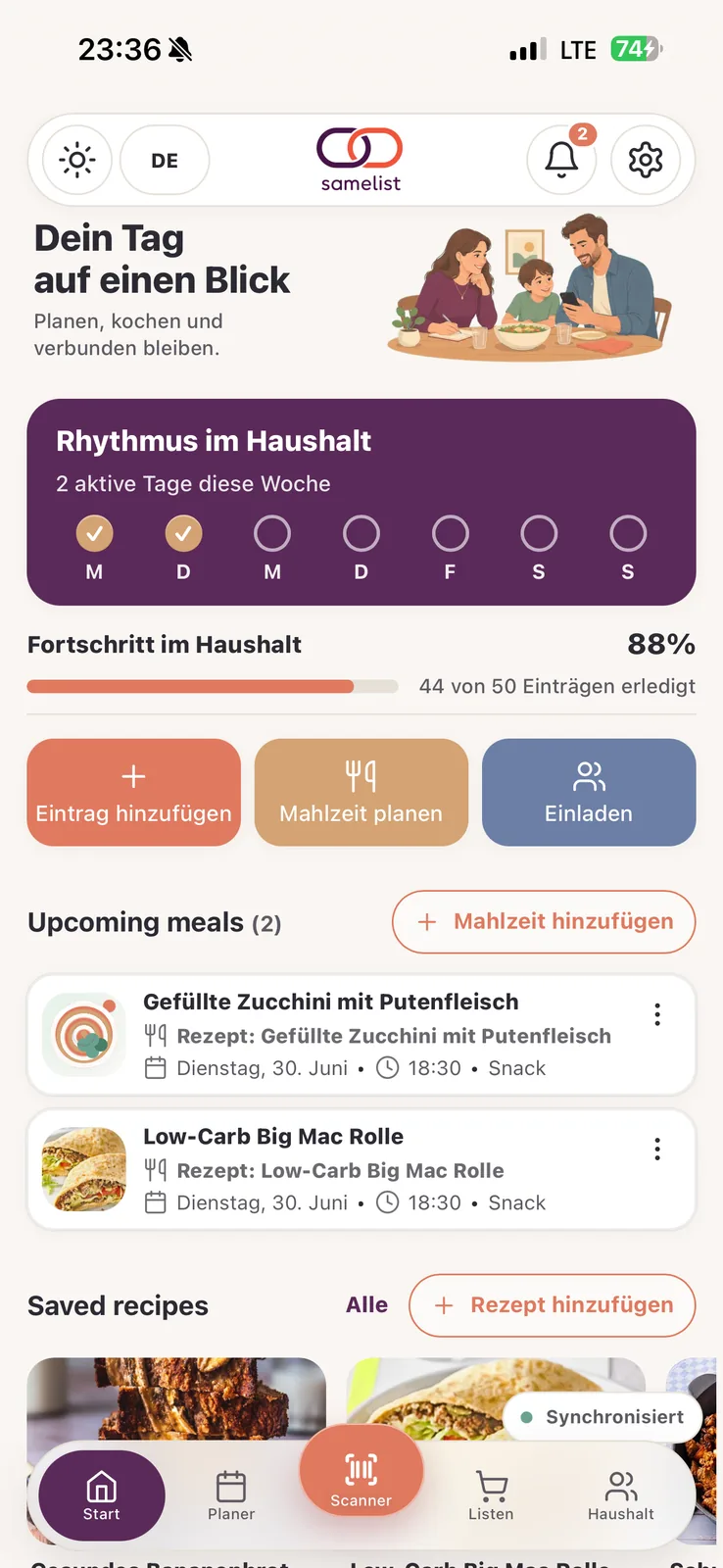
My own product · Web app & PWA

SameList

Organise shopping and household planning together.

A web application for shared lists and planning.

Starting point
Lists, meals and household planning need a shared view of the data.
System
SameList is my own product: shared lists, meal planning and household accounts. It shows how I bring interfaces, data and permissions together.

A web application for shared lists and planning.

Project enquiry
SameList meal plannerSameList overview for lists and household planning
Web app · PWA · Shared data · Permissions
04Documents & CRMView

Illustrative architecture · not a client project

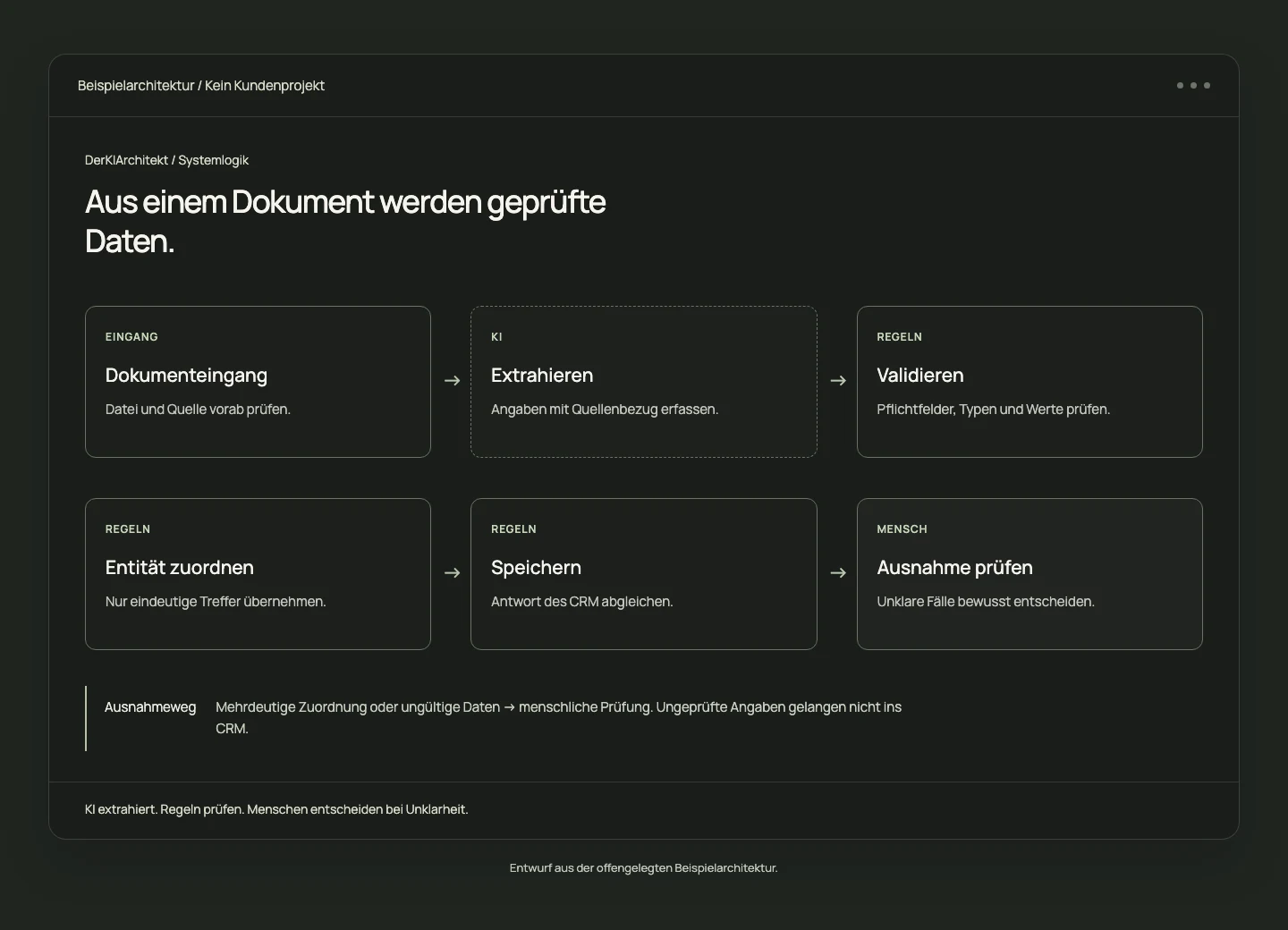
Document to CRM

Check document data and transfer it to the CRM.

The example's goal: checked data with a reference to the original.

Starting point
Read documents, transfer fields and find the right record.
System
The example shows how document data can be extracted, checked against rules and linked to a CRM record. Unclear cases are referred for manual review.

The example's goal: checked data with a reference to the original.

Project enquiry
Illustrative architecture: extract a document, validate data, match it unambiguously and save it in the CRM

Illustrative architecture · not a client project

Documents · Extraction · Validation · CRM

How your idea becomesa clear project.

Before implementation, we agree the scope, costs and criteria for a completed result.

  1. Understand the task and daily work.

    We clarify your current workflow, existing applications and the result you want.

    What you take away
    A defined taskThe current workflow, the desired result and open questions.

    You can assess whether the approach suits your business.

  2. Agree the scope and result.

    You receive a proposal covering scope, costs, responsibilities and acceptance criteria. It also sets out technical limitations.

    What you take away
    A specific proposalScope, effort, schedule and acceptance criteria.

    You decide whether to commission the work.

  3. Build and test together.

    You review progress using agreed cases. Exceptions, failures and required approvals are taken into account.

    What you take away
    A solution you can verifyThe agreed implementation and clear test results.

    You assess the result against your actual task.

  4. Hand over use and operation.

    You receive the agreed documentation and access. We clarify how the solution will be operated and how future changes will be handled.

    What you take away
    An organised handoverThe solution, documentation and clear operational responsibilities.

    We agree any support and extensions separately, as needed.

What would you like tosimplify?

You do not need a finished concept to get in touch. A few sentences about the task are enough.

Discuss your project

I’m Daniel Frank.

I develop websites, web applications and automations. You work directly with me, from the first question through to handover. We work together remotely.

What I work on

Web development
Websites & applications
Web
Automation
Workflows & integrations
Processes
Internal tools
Data & interfaces
Software
AI processing
When the task needs it
With purpose

My principle

“I look at the task first. Then I decide whether an integration, a workflow or custom software is the right solution.”

Daniel Frank, DerKIArchitekt

Accountability

E2E

From scoping to handover.

Tools I build with

Questions before you start.

Which workflows can you automate?

Recurring tasks with a clear input and a result that can be checked. Examples include matching enquiries, checking details from documents and reminders for pending approvals. I first review data, rules and exceptions and define a useful first project with you.

Does our existing software need to be replaced?

That is not the starting point. I first review how your existing applications can exchange data. Whether a connection is possible depends on integrations, licences and permissions. If reliable access is missing, I explain that limit before implementation.

Does automation require AI?

Often it does not. Defined rules are enough for calculations, required fields and unambiguous matching. AI can help structure free text or document content. I use it only for a justified task and plan appropriate checks for its results.

Do you also develop websites and internal applications?

Yes. I develop websites, web applications and internal tools. This might be a company website with an enquiry form or an interface for tasks, data and approvals. Before implementation, we clarify functions, content, access and subsequent operation.

What does a project cost, and how long does it take?

That depends on scope, the systems involved and the checks required. After the initial clarification, you receive a proposal with deliverables, costs and timing. Ongoing provider fees and possible support are identified separately. We discuss new requirements separately.

What happens when errors or unclear details occur?

The workflow has an agreed review path for these cases. We establish when it stops, makes a limited retry or passes a task to the responsible person. Important actions can require human approval. Missing confirmation is not treated as success.

What do we receive at handover?

You receive the agreed implementation, documentation and an introduction to its use. We clarify access, responsibilities and what to do if something fails. Maintenance, monitoring and later extensions can be agreed separately. Ongoing support is not automatically included.

How does working together work?

You work directly with me, from initial clarification to handover. Collaboration is remote. You first describe your task; we then clarify possibilities, scope and the result. Initial contact can start by email. You do not need a booked meeting to send an enquiry.

Which details do you need for an enquiry?

A few sentences about the task, applications involved and desired result are enough to start. Please do not send customer data, passwords or confidential documents yet. If sample data is needed, we agree on a suitable method later.

What would you like to simplify?

Describe the task and the applications involved. A few sentences are enough to get started.

I will get in touch to clarify any open questions and the next step. Your enquiry carries no obligation.

Daniel FrankConcept & implementation
Prefer to email directly?hello@derkiarchitekt.de

Your project

Choose a topic and enter your name and email address. All other details are optional.

Your project enquiry
How can I help? Required

Select all the topics that apply to your project.

How can I reach you?

So I can respond to your enquiry.

Some context helps. You don’t need a finished brief.

Please do not include customer data, passwords or confidential documents.

There’s no obligation. Your details are used to respond to your enquiry. Privacy information